image.png
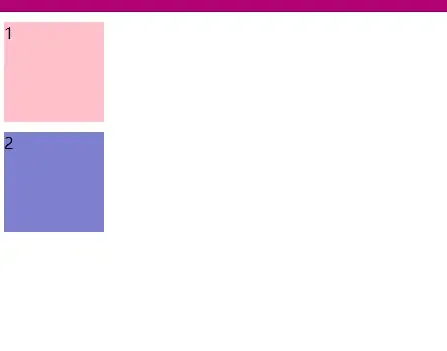
发现两个同级的块级盒子在垂直方向上margin值应该是20px,但是却只有10px,发生了重叠
于是我使用BFC的一条规则 ” overflow: hidden; “来去除重叠问题
<!DOCTYPE html>
<html lang="en">
<head>
    <meta charset="UTF-8">
    <title>Title</title>
    <style>
        *{
            margin:0;
            padding:0;
        }
        .a{
            width:100px;
            height:100px;
            background-color: pink;
            margin:10px;
        }
        .b{
            width:100px;
            height:100px;
            background-color: rgb(126, 127, 206);
            margin:10px;
        }
        .c{
            overflow: hidden;
        }
    </style>
</head>
<body>
    <div>
        <div class="a">1</div>
        <div class="c">
            <div class="b">2</div>


        </div>
    </div>
</body>
</html>
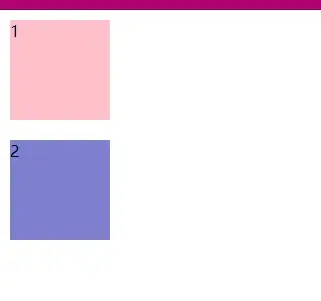
image.png
2.浮动问题
<!DOCTYPE html>
<html lang="en">
<head>
    <meta charset="UTF-8">
    <title>Title</title>
    <style>
        *{
            margin:0;
            padding:0;
        }

        .one{
            width:100px;
            height:100px;
            background-color: rgb(150, 206, 150);
            float:left;
        }
        .two{
            width:200px;
            height:200px;
            background-color: rgb(161, 149, 216);
        }

    </style>
</head>
<body>

    <div>
        <div class="one">1</div>
        <div class="two">2</div>
    </div>
</body>
</html>
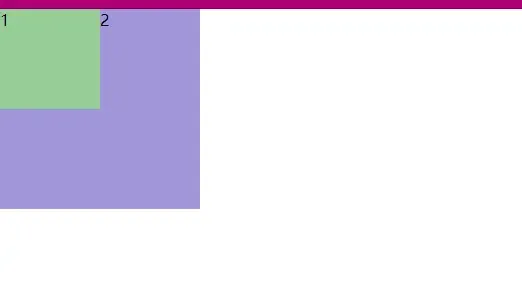
image.png
使用 display: inline-block;
<!DOCTYPE html>
<html lang="en">
<head>
    <meta charset="UTF-8">
    <title>Title</title>
    <style>
        *{
            margin:0;
            padding:0;
        }

        .one{
            width:100px;
            height:100px;
            background-color: rgb(150, 206, 150);
            float:left;
        }
        .two{
            width:200px;
            height:200px;
            background-color: rgb(161, 149, 216);
        }
        .father{
            display: inline-block;
        }
    </style>
</head>
<body>

    <div>
        <div class="one">1</div>
        <div class="father">
            <div class="two">2</div>
        </div>
    </div>
</body>
</html>

image.png
文章均来自互联网如有不妥请联系作者删除QQ:314111741 地址:http://www.mqs.net/post/15004.html

添加新评论