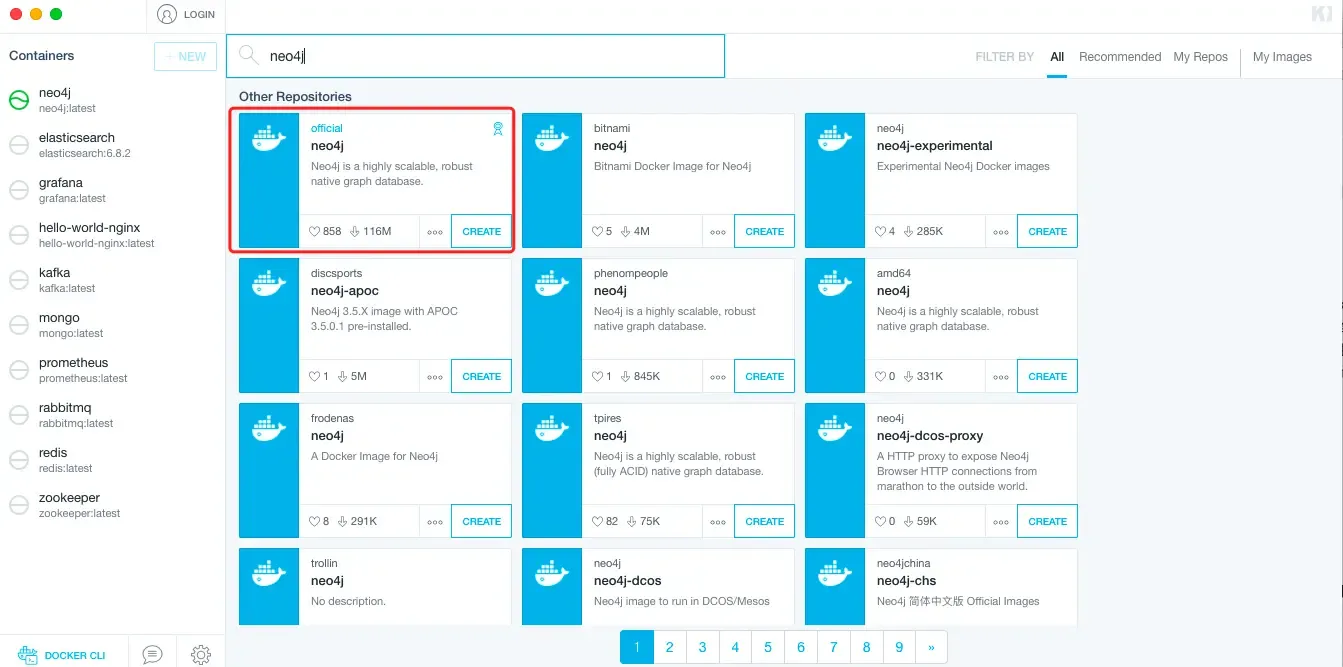
wechatimg13.png
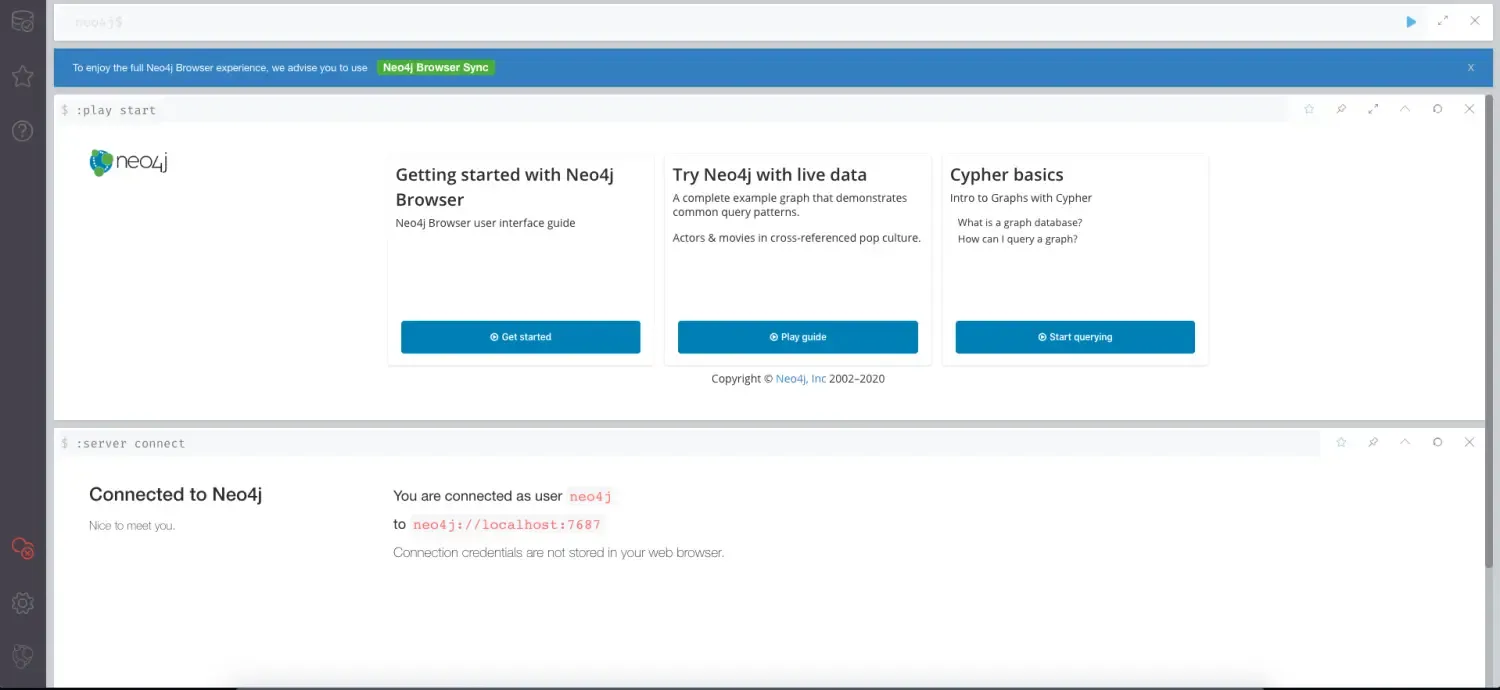
3.安装完成后,访问对应web地址,如下:
wechatimg13.png
3.SpringBoot整合
接下来介绍SpringBoot中如何视同Neo4j。
3.1 添加Neo4j依赖
创建项目,pom文件中引入依赖,如下:
<dependency>
    <groupId>org.springframework.boot</groupId>
    <artifactId>spring-boot-starter-data-neo4j</artifactId>
</dependency>
3.2 配置文件
在配置文件中配置Neo4j相关配置,如下:
# neo4j配置
spring.data.neo4j.uri= bolt://localhost:7687
spring.data.neo4j.username=neo4j
spring.data.neo4j.password=neo4j
3.3 创建对应entity
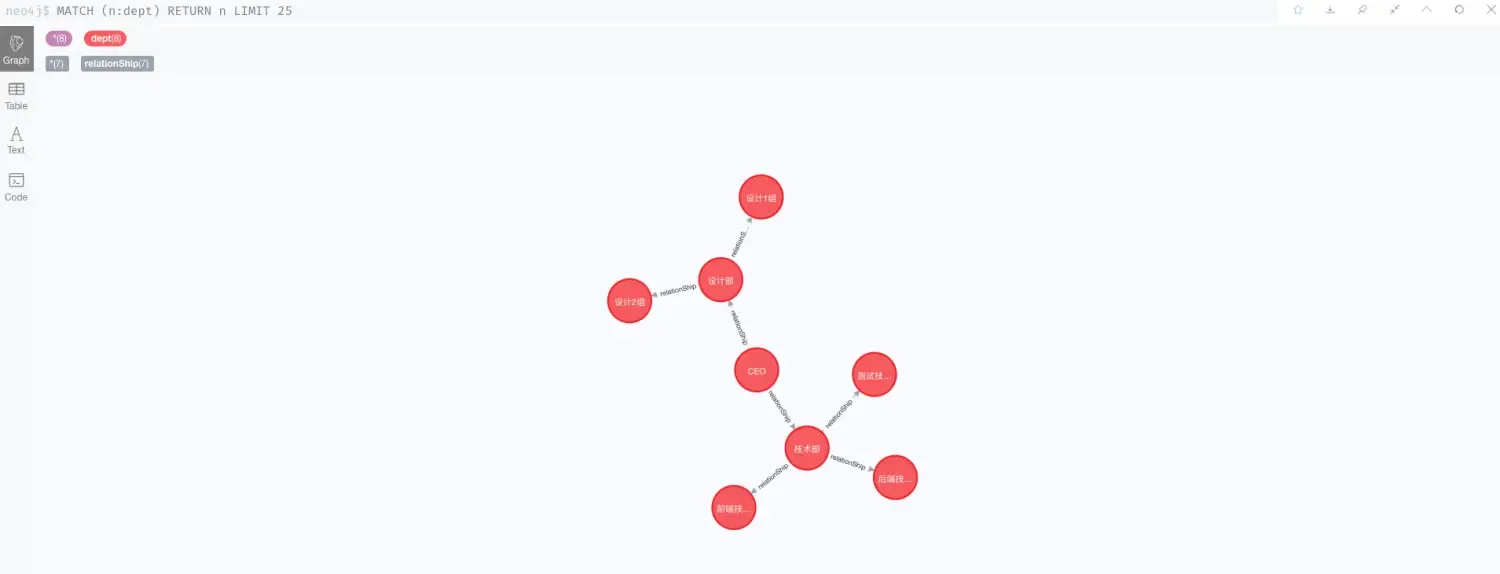
这里以部门为例,要创建一个如下的图:
     * CEO
     *    -设计部
     *        - 设计1组
     *        - 设计2组
     *    -技术部
     *        - 前端技术部
     *        - 后端技术部
     *        - 测试技术部
那么这里简单创建一个部门实体和一个关系实体。
其中部门实体,如下:
@NodeEntity(label = "dept")
@Data
@Builder
public class Dept {

    @Id
    @GeneratedValue
    private Long id;

    @Property(name = "deptName")
    private String deptName;

}
关系实体如下:
@RelationshipEntity(type = "relationShip")
@Data
@Builder
public class RelationShip {

    @Id
    @GeneratedValue
    private Long id;

    @StartNode
    private Dept parent;

    @EndNode
    private Dept child;
}
这里说明一下几个注解的意思:
- @NodeEntity:标明是一个节点实体
- @RelationshipEntity:标明是一个关系实体
- @Id:实体主键
- @Property:实体属性
- @GeneratedValue:实体属性值自增
- @StartNode:开始节点(可以理解为父节点)
- @EndNode:结束节点(可以理解为子节点)
3.4 repository
由于使用的spring-data操作neo4j,所以实现逻辑类似,创建接口继承Neo4jRepository。
DeptRepository如下:
import org.springframework.data.neo4j.repository.Neo4jRepository;
import org.springframework.stereotype.Repository;

@Repository
public interface DeptRepository extends Neo4jRepository<Dept,Long> {

}
RelationShipRepository如下:
import org.springframework.data.neo4j.repository.Neo4jRepository;
import org.springframework.stereotype.Repository;

@Repository
public interface RelationShipRepository extends Neo4jRepository<RelationShip, Long> {

}
3.5 基本使用
这里创建了一些基础方法,使用方式和spring-data-jpa类似,由于需要构建一个本文3.1所描述的图,所以创建了一个create方法来初始化数据,完整代码如下:
@RestController
public class TestController {

    @Resource
    private DeptRepository deptRepository;
    @Resource
    private RelationShipRepository relationShipRepository;

    /**
     * CEO
     *    -设计部
     *        - 设计1组
     *        - 设计2组
     *    -技术部
     *        - 前端技术部
     *        - 后端技术部
     *        - 测试技术部
     */
    @GetMapping("create")
    public void create(){
        Dept CEO = Dept.builder().deptName("CEO").build();
        Dept dept1 = Dept.builder().deptName("设计部").build();
        Dept dept11 = Dept.builder().deptName("设计1组").build();
        Dept dept12 = Dept.builder().deptName("设计2组").build();

        Dept dept2 = Dept.builder().deptName("技术部").build();
        Dept dept21 = Dept.builder().deptName("前端技术部").build();
        Dept dept22 = Dept.builder().deptName("后端技术部").build();
        Dept dept23 = Dept.builder().deptName("测试技术部").build();
        List<Dept> depts = new ArrayList<>(Arrays.asList(CEO,dept1,dept11,dept12,dept2,dept21,dept22,dept23));
        deptRepository.saveAll(depts);

        RelationShip relationShip1 = RelationShip.builder().parent(CEO).child(dept1).build();
        RelationShip relationShip2 = RelationShip.builder().parent(CEO).child(dept2).build();
        RelationShip relationShip3 = RelationShip.builder().parent(dept1).child(dept11).build();
        RelationShip relationShip4 = RelationShip.builder().parent(dept1).child(dept12).build();
        RelationShip relationShip5 = RelationShip.builder().parent(dept2).child(dept21).build();
        RelationShip relationShip6 = RelationShip.builder().parent(dept2).child(dept22).build();
        RelationShip relationShip7 = RelationShip.builder().parent(dept2).child(dept23).build();
        List<RelationShip> relationShips = new ArrayList<>(Arrays.asList(relationShip1,relationShip2,relationShip3,relationShip4,relationShip5
                ,relationShip6,relationShip7));
        relationShipRepository.saveAll(relationShips);
    }

    @GetMapping("get")
    public RelationShip get(Long id){
        Optional<RelationShip> byId = relationShipRepository.findById(id);
        return byId.orElse(null);
    }

    @GetMapping("deleteRelationShip")
    public void deleteRelationShip(Long id){
        relationShipRepository.deleteById(id);
    }

    @GetMapping("deleteDept")
    public void deleteDept(Long id){
        deptRepository.deleteById(id);
    }

    @GetMapping("deleteAll")
    public void deleteAll(){
        deptRepository.deleteAll();
        relationShipRepository.deleteAll();
    }
}
执行create方法初始化数据,结果如下图所示:
wechatimg13.png
其余测试方法这里就不在演示了,可以自行测试。
4.Neo4j基本命令
4.1 操作命令简介
接下来介绍一下Neo4j的基本操作命令。
- CREATE命令:创建节点命令
- MATCH命令:查询命令
- RETURN命令:返回数据命令
- DELETE命令:删除命令,可以用于删除节点和关联节点信息
- REMOVE命令:可以用于删除标签和属性
4.2 简单练习
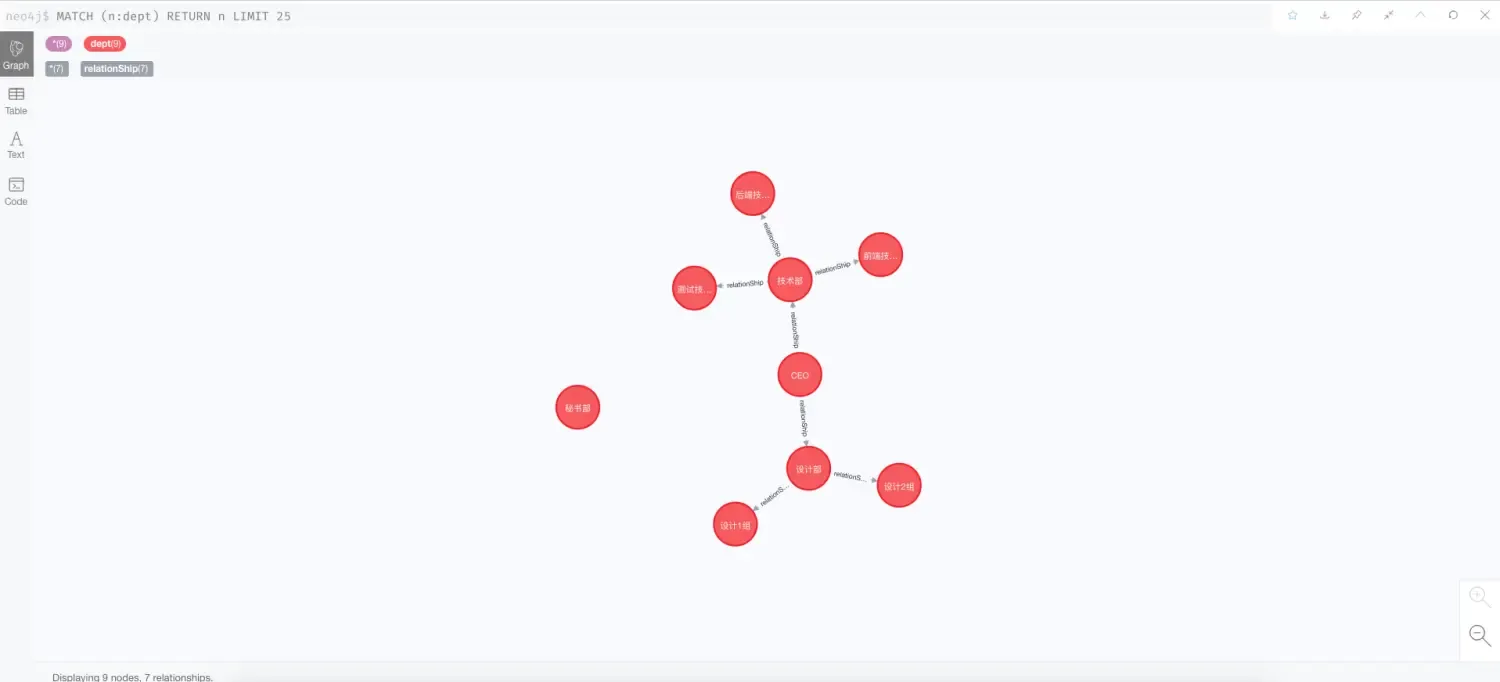
创建命令,可以用来创建节点和关系节点,比如我们要在创建一个部门,秘书部,如下,执行如下命令:
CREATE (d:dept {deptName:"秘书部"})
操作后如下图所示:
wechatimg13.png
目前可以看到,秘书部和其余节点是没有关系的,那么接下来将秘书部与CEO创建关系,执行如下命令:
MATCH (n:dept {deptName:"CEO"}),(m:dept {deptName:"秘书部"}) CREATE (n)-[r:relationShip]->(m) return r;
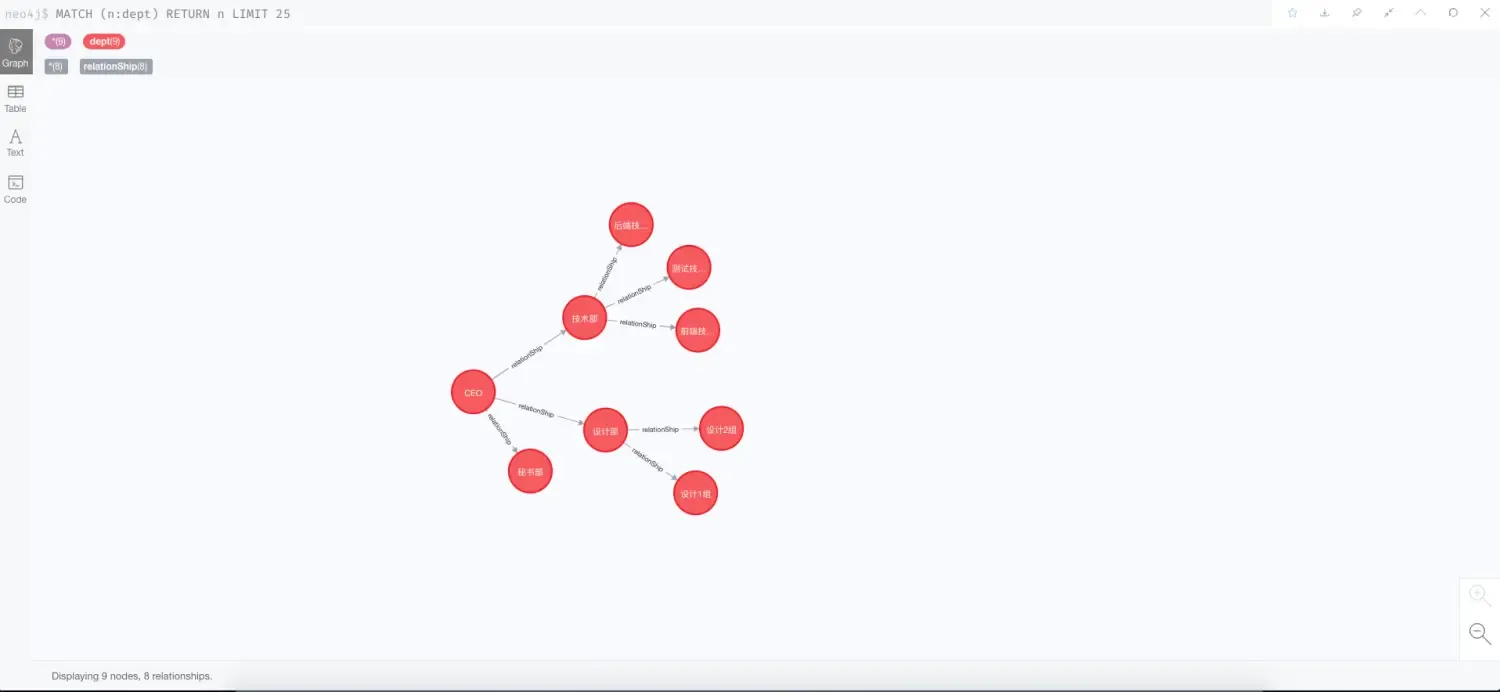
查看结果如图:
wechatimg13.png
可以看到秘书部已经挂在了CEO节点下。
其中从上面就可以看出,CQL语句大致结构如下:
- MATCH RETURN:查询命中结果返回;
- MATCH CREATE RETURN:查询后创建关系返回;
- MATCH DELETE:查询命中删除;
…
5.源码
源码地址:https://gitee.com/dalaoyang/springboot_learn/tree/master/springboot2_neo4j
6.参考
参考地址:
https://baike.baidu.com/item/Neo4j/9952114?fr=aladdin
http://www.neo4j.org
文章均来自互联网如有不妥请联系作者删除QQ:314111741 地址:http://www.mqs.net/post/15403.html

添加新评论