AS.png
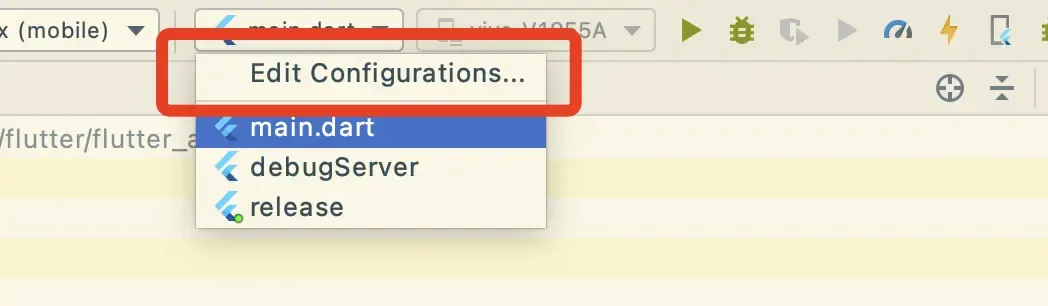
在 additional run args 里面添加 --dart-define=DART_DEFINE_APP_ENV=debug
然后重复添加 release.
如下图
编译的时候选择对应的选项.
vs code
替换 launch.json 里面的内容
{

    // 使用 IntelliSense 了解相关属性。

    // 悬停以查看现有属性的描述。

    // 欲了解更多信息,请访问: https://go.microsoft.com/fwlink/?linkid=830387

    "version": "0.2.0",

    "configurations": [

        {

            "name": "flutter_app_2_0_debug",

            "request": "launch",

            "type": "dart",

            "args": [

                "--dart-define",

                "DART_DEFINE_APP_ENV=debug",

            ]

        },

        {

            "name": "flutter_app_2_0_server",

            "request": "launch",

            "type": "dart",

            "args": [

                "--dart-define",

                "DART_DEFINE_APP_ENV=server",

            ]

        },

        {

            "name": "flutter_app_2_0_release",

            "request": "launch",

            "type": "dart",

            "args": [

                "--dart-define",

                "DART_DEFINE_APP_ENV=release",

            ]

        }

    ]

}
在调试模式里面选择对应的环境.
原生多渠道
上面只能修改flutter 自己的环境, 有时候我们需要用到第三方库,需要再原生环境里面配置不同的数据,这时候怎么办呢.别急.来看看我怎么替换原生环境数据的
以我项目为例, 我接入的融云sdk 需要配置不同环境的key.
iOS
ios 是通过 xcconfig 来生成变量的.
我们再 user-define 里面发现 DART-DEFINES 里面会多一个 flutter.inspector.structuredErrors 值, 这个貌似不符合xcconfig的key定义.所以处理方式是把这个值给处理掉. 然后根据dart-defines 获取当前环境 然后通过脚本生成xcconfig.
如图. 新建一个 scheme.
在如图位置 添加脚本.
脚本代码
# Type a script or drag a script file from your workspace to insert its path.

function urldecode() { : "${*//+/ }"; echo "${_//%/\\x}"; }

IFS=',' read -r -a define_items <<< "$DART_DEFINES"

debug_env=DART_DEFINE_APP_ENV=debug

debug_server_env=DART_DEFINE_APP_ENV=debugServer

for index in "${!define_items[@]}"

do

    define_items[$index]=$(urldecode "${define_items[$index]}");

done

if [ ${#define_items[*]} > 1 ]; then

    # # echo ${#define_items[*]}

    # echo $define_items

    if [ ${define_items[0]} = $debug_env ]; then

        define_items[1]=RONGYUN=@"\"lmxuhwagl66vd\""

    elif [ ${define_items[0]} = $debug_server_env ]; then

        define_items[1]=RONGYUN=@"\"lmxuhwagl66vd\""

    else

        define_items[1]=RONGYUN=@"\"z3v5yqkbz22m0\""

    fi

    # unset define_items[1]

fi

# if [ ${#define_items[*]} > 0 ]; then

#    define_items

# fi

# fi

# echo ${define_items[1]}

# printf $define_items

# unset define_items[1]

# printf $define_items

# printf "$s\n" "${define_items[@]}"

printf "%s\n" "${define_items[@]}" > ${SRCROOT}/Flutter/DartDefines.xcconfig
这样就在 flutter 目录生成了 DartDefines.xcconfig文件
在 Debug.xcconfig 和 Release.xcconfig 分别引用这个文件.
编译后 就可以看到 RONGYUN 被添加到 用户定义的key里面去了
使用
在 Flutter 目录新建一个 Dart.xcconfig文件
DART_DEFINE_APP_ENV=release

#include "DartDefines.xcconfig"

GCC_PREPROCESSOR_DEFINITIONS = $(inherited) RONGYUNKEY='$(RONGYUN)'
在 Debug.xcconfig 和 Release.xcconfig 分别引用这个文件.
NSString * rongyunKey = [RONGYUNKEY stringByAppendingPathExtension:@""];

    //生产环境

    [[RCIMClient sharedRCIMClient] initWithAppKey:rongyunKey];
android
安卓主要通过gradle 来生成
定义多渠道的值
在项目根目录新建一个 dart.properties 文件
添加如下内容
debug=rongyun=lmxuhwagl66vd,

debugServer=rongyun=lmxuhwagl66vd,

release=rongyun=z3v5yqkbz2
通过gradle 来生成环境值
在 app 下面的 build.gradle 的 android 里面添加如下内容
/// 设置默认配置参数

    def dartDefine = [

            DART_DEFINE_APP_ENV: 'debug',

    ]

    if (project.hasProperty('dart-defines')) {

        dartDefine = dartDefine + project.property('dart-defines')

                .split(',')

                .collectEntries { entry ->

                    def pair = URLDecoder.decode(entry).split('=')

                    [(pair.first()): pair.last()]

                }

    }

    println(dartDefine)

    def dartFile = rootProject.file("dart.properties")

    def dartProperties = new Properties()

    dartProperties.load(new FileInputStream(dartFile))

    println(dartProperties)

    def currentEvn = dartDefine.DART_DEFINE_APP_ENV

    println(currentEvn)

    def currentProperties = dartProperties["$currentEvn"]

//

    println(currentProperties)

    dartDefine = dartDefine + currentProperties

            .split(',')

            .collectEntries { entry ->

                def pair = URLDecoder.decode(entry).split('=')

                [(pair.first()): pair.last()]

            }

    println(dartDefine)
在 defaultConfig 中的 manifestPlaceholders 添加 RONGYUN : dartDefine.rongyun.
androidmanifest.xml 中定义 meta
<meta-data

            android:name="RONGYUN"

            android:value="${RONGYUN}" />
java中使用
val appInfo: ApplicationInfo = this.packageManager.getApplicationInfo(packageName, PackageManager.GET_META_DATA)

val rongyunKey: String? = appInfo.metaData.getString("RONGYUN")

RongIMClient.init(this, "$rongyunKey")
这样就完全做到了多渠道构建!
码字不易!!!!
文章均来自互联网如有不妥请联系作者删除QQ:314111741 地址:http://www.mqs.net/post/12909.html
添加新评论