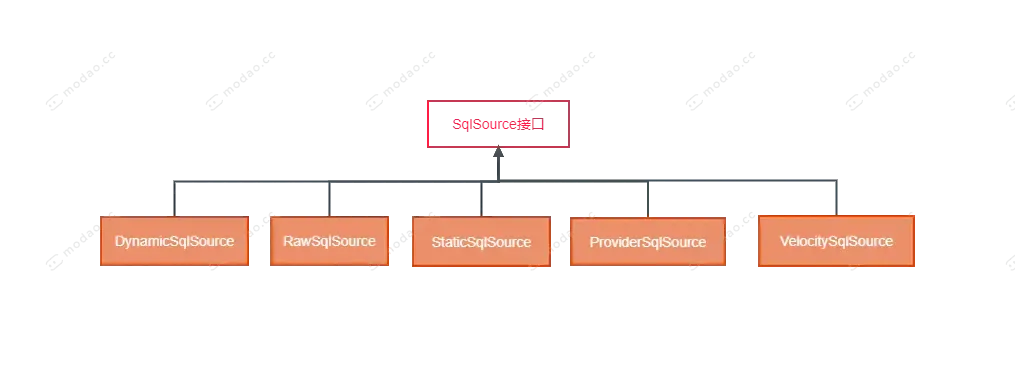
SqlSource接口.png
-
DynamicSqlSource
主要是封装动态SQL标签解析之后的SQL语句和带有${}的SQL语句
RawSqlSource
主要封装带有#{}的SQL语句
StaticSqlSource
是BoundSql中要存储SQL语句的一个载体,上面两个SqlSource的SQL语句,最终都会存储到该SqlSource实现类中
SqlSourceBuilder
主要完成了两方面的操作,一方面是解析Sql中的#{}占位符定义的属性,如jdbcType、javaType(使用较少),一方面是把#{}占位符替换成?占位符
ParameterMappingTokenHandler
SqlSourceBuilder的一个内部类,该类是解析#{}的核心。
GenericTokenParser
分词解析器
二、流程图
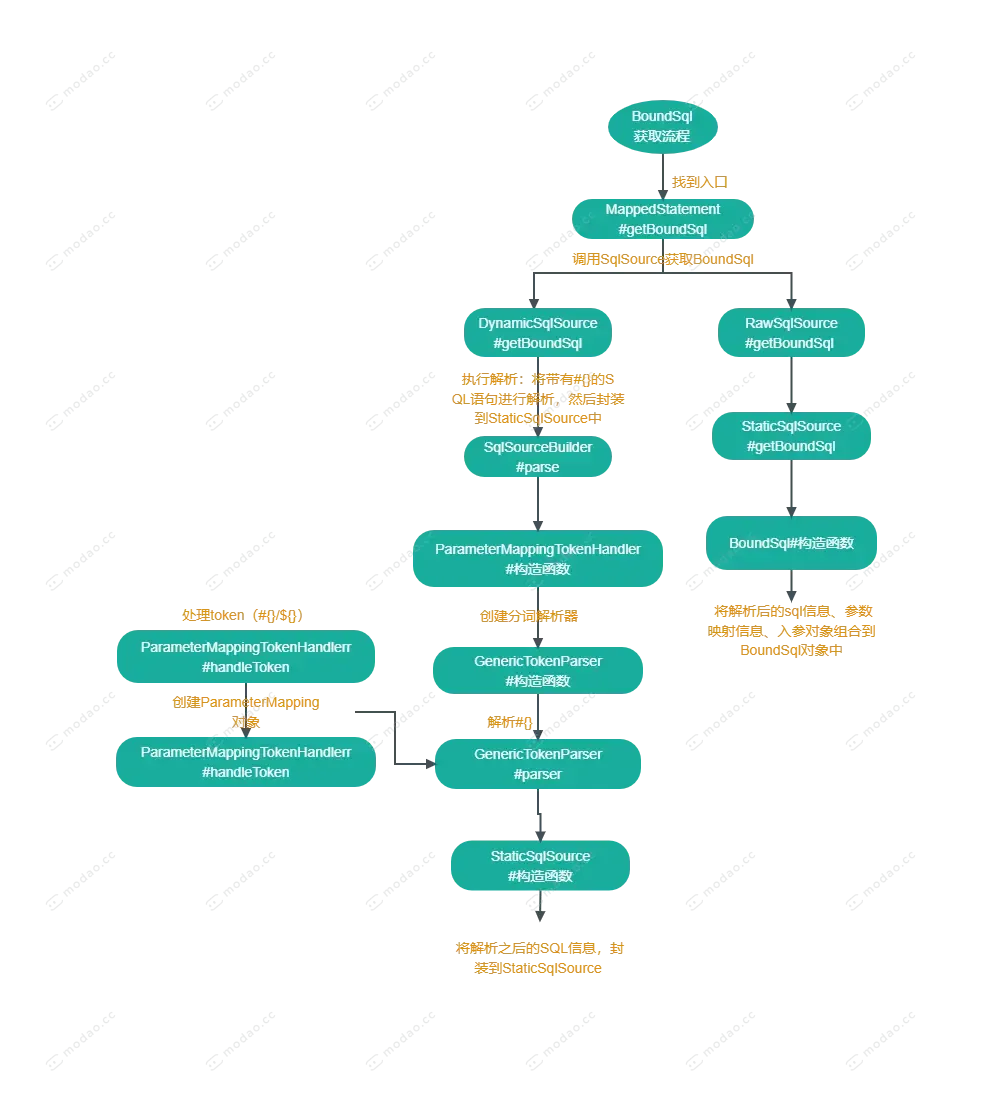
BoundSql获取流程.png
三、流程分析
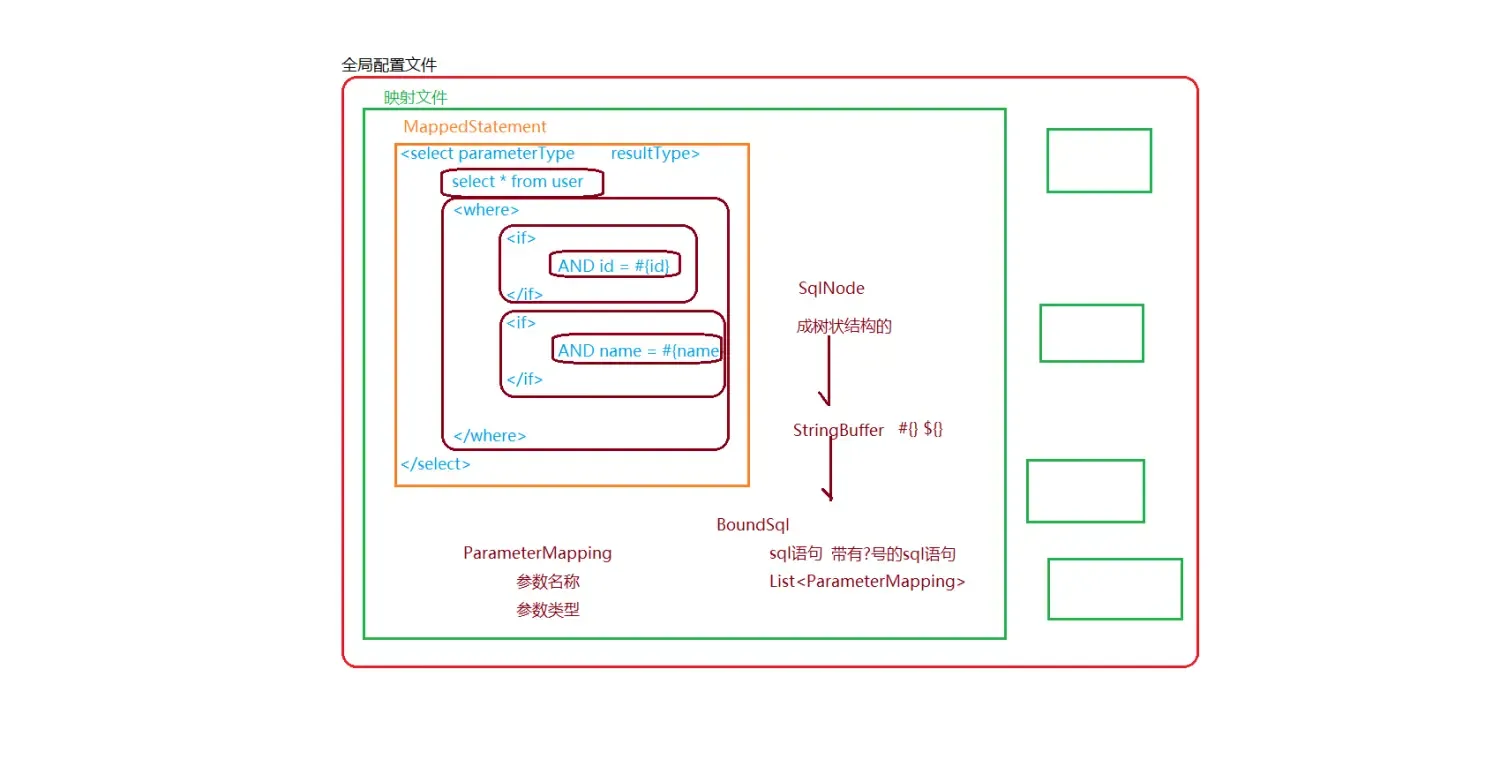
02.png
-
入口:MappedStatement#getBoundSql
public BoundSql getBoundSql(Object parameterObject) {
    // 调用SqlSource获取BoundSql
    BoundSql boundSql = sqlSource.getBoundSql(parameterObject);
    List<ParameterMapping> parameterMappings = boundSql.getParameterMappings();
    if (parameterMappings == null || parameterMappings.isEmpty()) {
      boundSql = new BoundSql(configuration, boundSql.getSql(), parameterMap.getParameterMappings(), parameterObject);
    }

    // check for nested result maps in parameter mappings (issue #30)
    for (ParameterMapping pm : boundSql.getParameterMappings()) {
      String rmId = pm.getResultMapId();
      if (rmId != null) {
        ResultMap rm = configuration.getResultMap(rmId);
        if (rm != null) {
          hasNestedResultMaps |= rm.hasNestedResultMaps();
        }
      }
    }

    return boundSql;
  }
-
DynamicSqlSource#getBoundSql
@Override
    public BoundSql getBoundSql(Object parameterObject) {
        DynamicContext context = new DynamicContext(configuration, parameterObject);
        // 此处会调用MixedSqlNode中包含的所有SqlNode的apply方法
        // 此处会处理${},也会处理动态标签
        // 最终将所有的SqlNode信息进行解析之后,追加到DynamicContext对象的StringBuilder对象中
        rootSqlNode.apply(context);
        // 创建SQL信息解析器
        SqlSourceBuilder sqlSourceParser = new SqlSourceBuilder(configuration);
        // 获取入参类型
        Class<?> parameterType = parameterObject == null ? Object.class : parameterObject.getClass();
        // 执行解析:将带有#{}的SQL语句进行解析,然后封装到StaticSqlSource中
        SqlSource sqlSource = sqlSourceParser.parse(context.getSql(), parameterType, context.getBindings());
        // 将解析后的SQL语句还有入参绑定到一起(封装到一个对象中,此时还没有将参数替换到SQL占位符?)
        BoundSql boundSql = sqlSource.getBoundSql(parameterObject);
        for (Map.Entry<String, Object> entry : context.getBindings().entrySet()) {
            boundSql.setAdditionalParameter(entry.getKey(), entry.getValue());
        }
        return boundSql;
    }
-
流程图
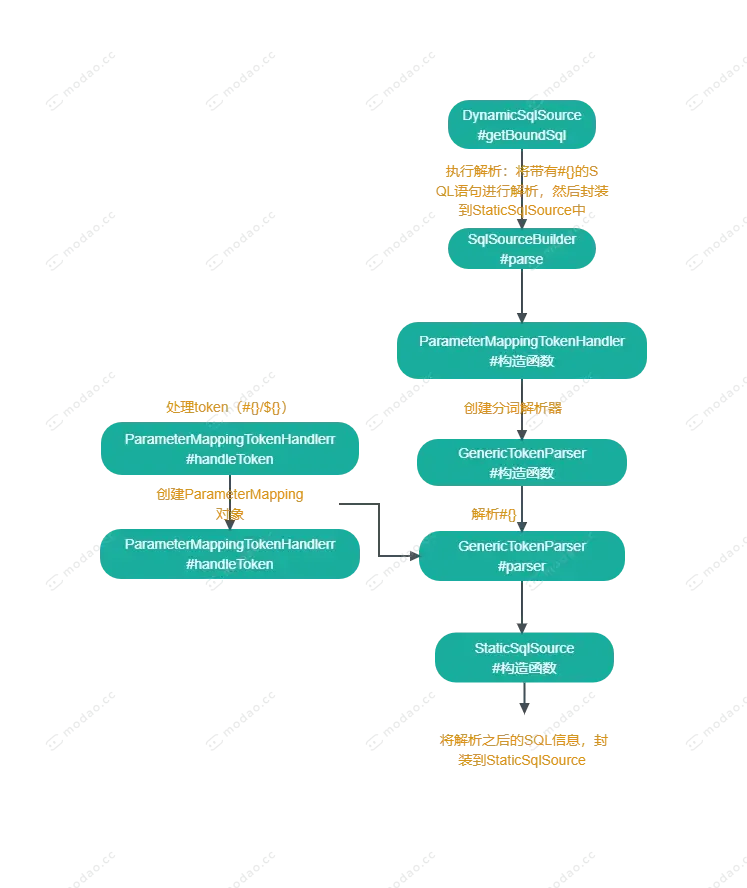
DynamicSqlSource#getBoundSql.png
-
1.SqlSourceBuilder#parse
执行解析:将带有#{}的SQL语句进行解析,然后封装到StaticSqlSource中
- 创建ParameterMappingTokenHandler
- 创建GenericTokenParser
- 然后解析originalSql
- 最后将解析之后的SQL信息,封装到StaticSqlSource对象中
public SqlSource parse(String originalSql, Class<?> parameterType, Map<String, Object> additionalParameters) {
        // 对#{}这样的字符串内容的解析处理类
        ParameterMappingTokenHandler handler = new ParameterMappingTokenHandler(configuration, parameterType,
                additionalParameters);
        // 创建分词解析器
        GenericTokenParser parser = new GenericTokenParser("#{", "}", handler);
        // 解析#{}
        String sql = parser.parse(originalSql);
        // 将解析之后的SQL信息,封装到StaticSqlSource对象中
        // SQL字符串是带有?号的字符串,?相关的参数信息,封装到ParameterMapping集合中
        return new StaticSqlSource(configuration, sql, handler.getParameterMappings());
    }
-
1.1 ParameterMappingTokenHandler#构造方法
public ParameterMappingTokenHandler(Configuration configuration, Class<?> parameterType,
                Map<String, Object> additionalParameters) {
            super(configuration);
            this.parameterType = parameterType;
            this.metaParameters = configuration.newMetaObject(additionalParameters);
        }
-
1.2 GenericTokenParser#构造函数
创建分词解析器
public GenericTokenParser(String openToken, String closeToken, TokenHandler handler) {
    this.openToken = openToken;
    this.closeToken = closeToken;
    this.handler = handler;
  }
-
1.3 GenericTokenParser#parse
解析#{}
/**
   * 解析${}和#{}
   * @param text
   * @return
   */
  public String parse(String text) {
    if (text == null || text.isEmpty()) {
      return "";
    }
    // search open token
    int start = text.indexOf(openToken, 0);
    if (start == -1) {
      return text;
    }
    char[] src = text.toCharArray();
    int offset = 0;
    final StringBuilder builder = new StringBuilder();
    StringBuilder expression = null;
    while (start > -1) {
      if (start > 0 && src[start - 1] == '\\') {
        // this open token is escaped. remove the backslash and continue.
        builder.append(src, offset, start - offset - 1).append(openToken);
        offset = start + openToken.length();
      } else {
        // found open token. let's search close token.
        if (expression == null) {
          expression = new StringBuilder();
        } else {
          expression.setLength(0);
        }
        builder.append(src, offset, start - offset);
        offset = start + openToken.length();
        int end = text.indexOf(closeToken, offset);
        while (end > -1) {
          if (end > offset && src[end - 1] == '\\') {
            // this close token is escaped. remove the backslash and continue.
            expression.append(src, offset, end - offset - 1).append(closeToken);
            offset = end + closeToken.length();
            end = text.indexOf(closeToken, offset);
          } else {
            expression.append(src, offset, end - offset);
            offset = end + closeToken.length();
            break;
          }
        }
        if (end == -1) {
          // close token was not found.
          builder.append(src, start, src.length - start);
          offset = src.length;
        } else {
          builder.append(handler.handleToken(expression.toString()));
          offset = end + closeToken.length();
        }
      }
      start = text.indexOf(openToken, offset);
    }
    if (offset < src.length) {
      builder.append(src, offset, src.length - offset);
    }
    return builder.toString();
  }
-
1.3.1 ParameterMappingTokenHandlerr#handleToken
处理token(#{}/${})
@Override
public String handleToken(String content) {
        // 此处的作用就是对`#{}`节点中的key值保存映射,比如javaType/jdbcType/mode等信息
        parameterMappings.add(buildParameterMapping(content));
        // 将`#{}`替换为?,即一般包装成`select * form test where name=? and age=?`预表达式语句
        return "?";
    }
-
1.3.1.1 ParameterMappingTokenHandlerr#handleToken
创建ParameterMapping对象
       private ParameterMapping buildParameterMapping(String content) {
            Map<String, String> propertiesMap = parseParameterMapping(content);
            String property = propertiesMap.get("property");
            Class<?> propertyType;
            if (metaParameters.hasGetter(property)) { // issue #448 get type from additional params
                propertyType = metaParameters.getGetterType(property);
            } else if (typeHandlerRegistry.hasTypeHandler(parameterType)) {
                propertyType = parameterType;
            } else if (JdbcType.CURSOR.name().equals(propertiesMap.get("jdbcType"))) {
                propertyType = java.sql.ResultSet.class;
            } else if (property == null || Map.class.isAssignableFrom(parameterType)) {
                propertyType = Object.class;
            } else {
                MetaClass metaClass = MetaClass.forClass(parameterType, configuration.getReflectorFactory());
                if (metaClass.hasGetter(property)) {
                    propertyType = metaClass.getGetterType(property);
                } else {
                    propertyType = Object.class;
                }
            }
            ParameterMapping.Builder builder = new ParameterMapping.Builder(configuration, property, propertyType);
            Class<?> javaType = propertyType;
            String typeHandlerAlias = null;
            for (Map.Entry<String, String> entry : propertiesMap.entrySet()) {
                String name = entry.getKey();
                String value = entry.getValue();
                if ("javaType".equals(name)) {
                    javaType = resolveClass(value);
                    builder.javaType(javaType);
                } else if ("jdbcType".equals(name)) {
                    builder.jdbcType(resolveJdbcType(value));
                } else if ("mode".equals(name)) {
                    builder.mode(resolveParameterMode(value));
                } else if ("numericScale".equals(name)) {
                    builder.numericScale(Integer.valueOf(value));
                } else if ("resultMap".equals(name)) {
                    builder.resultMapId(value);
                } else if ("typeHandler".equals(name)) {
                    typeHandlerAlias = value;
                } else if ("jdbcTypeName".equals(name)) {
                    builder.jdbcTypeName(value);
                } else if ("property".equals(name)) {
                    // Do Nothing
                } else if ("expression".equals(name)) {
                    throw new BuilderException("Expression based parameters are not supported yet");
                } else {
                    throw new BuilderException("An invalid property '" + name + "' was found in mapping #{" + content
                            + "}.  Valid properties are " + parameterProperties);
                }
            }
            if (typeHandlerAlias != null) {
                builder.typeHandler(resolveTypeHandler(javaType, typeHandlerAlias));
            }
            return builder.build();
        }
-
1.4 StaticSqlSource#构造函数
将解析之后的SQL信息,封装到StaticSqlSource对象中,SQL字符串是带有?号的字符串,?相关的参数信息,封装到ParameterMapping集合中
public StaticSqlSource(Configuration configuration, String sql, List<ParameterMapping> parameterMappings) {
    this.sql = sql;
    this.parameterMappings = parameterMappings;
    this.configuration = configuration;
  }
-
RawSqlSource#getBoundSql
@Override
    public BoundSql getBoundSql(Object parameterObject) {
        return sqlSource.getBoundSql(parameterObject);
    }
-
StaticSqlSource#getBoundSql
@Override
  public BoundSql getBoundSql(Object parameterObject) {
    return new BoundSql(configuration, sql, parameterMappings, parameterObject);
  }
-
BoundSql#构造函数
将解析后的sql信息、参数映射信息、入参对象组合到BoundSql对象中
public BoundSql(Configuration configuration, String sql, List<ParameterMapping> parameterMappings, Object parameterObject) {
    this.sql = sql;
    this.parameterMappings = parameterMappings;
    this.parameterObject = parameterObject;
    this.additionalParameters = new HashMap<>();
    this.metaParameters = configuration.newMetaObject(additionalParameters);
  }
文章均来自互联网如有不妥请联系作者删除QQ:314111741 地址:http://www.mqs.net/post/15236.html

添加新评论